
How to Enable TabFocus on Safari
- Open the Safari browser on your device.
- Click on the Safari menu located in the top left corner of your screen.
- Select Settings from the dropdown menu:
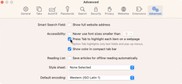
- Click on the Advanced tab in the Preferences window.
- Check the box that says Press Tab to highlight each item on a webpage.


How to Enable TabFocus on Firefox
- Open the Firefox browser on your device.
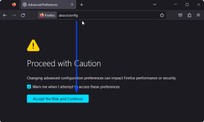
- Type about:config in the address bar and hit Enter.
- Click on the Accept the Risk and Continue button if it appears:
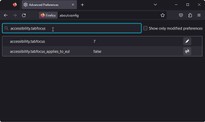
- In the search bar, type accessibility.tabfocus.
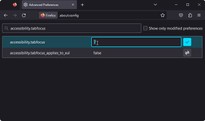
- Double-click on the accessibility.tabfocus preference to change its value to 7.
- Click the V button to save the changes.



If you require additional assistance, don’t hesitate to contact us at desk@support.userway.org.