



Issue:
Upon installation, the widget only shows 2 columns instead of the 3 columns of the Pro Widget. Additionally, changes made via the UserWay Dashboard do not take effect, such as color or position adjustments.
Pro Widget Example:


Symptoms:
- The website’s source code reveals the presence of the attribute
data-minify, with the SRC field displaying a minified URL instead of the expectedhttps://cdn.userway.org/widget.js:
<script data-minify="1" src="https://example.com/wp-content/cache/min/1/widget.js?ver=1710191213" data-account="123example"></script>- Websites with the WP-Rocket plugin installed and enabled experience this issue.
- The widget fails to display features available with the Pro version, such as screen-reader functionality.
- Attempts to log in using the “Manage” option of the widget are unsuccessful.
Resolution:
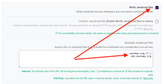
- If the website is using the WP-Rocket plugin, refer to the article “Exclude files from Load JavaScript Deferred” to whitelist your UserWay widget code:
- If the website is using a framework such as React, Vue, Nuxt, or any other, consider removing our script from any functions that could modify the original script.
- For other plugins or applications, consult the vendor for options to whitelist specific code to prevent minification of the widget code.

If you have any questions, you can reach our support team at desk@support.userway.org.