



- Access the UserWay Dashboard: Go to https://manage.userway.org in your web browser and log in using your UserWay credentials.
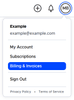
- Navigate to Billing & Invoices: After logging in, click on your profile icon located in the top right corner. From the dropdown menu, select “Billing & Invoices.”
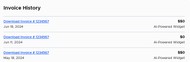
- Review Your Invoice History: In the “Billing & Invoices” section, navigate to the “Invoice History” section, where you can find the following essential details:
- Invoice Number #: Identifies the unique invoice identifier for each transaction.
- Solution: Specifies the solution or service purchased, such as AI-Powered Widget, add-ons, or Accessibility Monitor.
- Invoice Date: Displays the date when the invoice was issued.
- Price: Indicates the amount charged for the solution or service.


If you require additional assistance, feel free to contact us at desk@support.userway.org.