



Did you know that you can start automatically remediating your website by upgrading to the AI-Powered Pro Widget? Follow the steps below to upgrade and enhance your website’s compliance:
- Access the UserWay Dashboard: Open your web browser and go to https://manage.userway.org. Log in using your UserWay credentials.
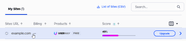
- Navigate to the Site List: In the left-hand menu, click on “My Sites.”
- Open the Settings for the Site: Click on the domain name of your site (e.g., example.com).
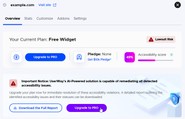
- Open the Overview Tab: Click on the “Upgrade to PRO” button.
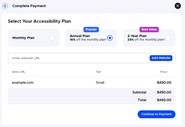
- Select Your Accessibility Plan: Choose between a Monthly Plan, Annual Plan, or 2-Year Plan, then click on “Continue to Payment.”
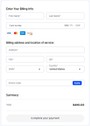
- Complete Your Payment: Enter your credit card information and click on “Complete Your Payment” to finalize the upgrade.





If you require additional assistance, feel free to contact us at desk@support.userway.org.