



- Log in to the UserWay Dashboard: Visit https://manage.userway.org and log in using your UserWay credentials.
- Access Billing & Invoices: On the top right-hand side of the screen, click on the initials representing the name of your account. From the dropdown menu, select “Billing & Invoices”:
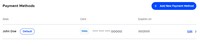
- View Credit Card Details: You will see the details of the credit card(s) associated with your account. Click on the “Edit” button next to the relevant credit card to access more information:
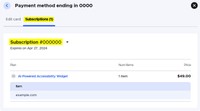
- Navigate to Subscriptions: In the new window that appears, navigate to the “Subscriptions” tab to view a list of all subscriptions associated with this specific credit card:



If you have any questions, you can reach out to our support team at desk@support.userway.org.