



The Accessibility Editor enables users to interactively verify, modify, and test screen reader navigation on the target website page. Here’s how you can access the Accessibility Editor:
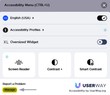
- Access the Widget Settings: Open the website where the widget is installed. Click on the “Manage” button and log in with your credentials.
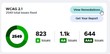
- Click on the “View Remediations” Button: This will take you to the remediation options available for your site.
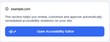
- Access the Editor: Next, click on the blue button labeled “Open Accessibility Editor.”



If you require additional assistance, feel free to contact us at desk@support.userway.org.