



Please follow the guide below to accept your invitation to be a team member in UserWay’s Accessibility Monitor.
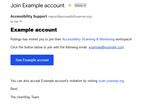
- Open your invitation email and click the Join <Your name> button as shown below:
- If you don’t have a UserWay account, create one. If you already have a UserWay account, skip to Step 3.
- Once logged into your Accessibility Scanner account, click on Your Name to reveal your available Teams as shown below:
- Select the team’s data you would like to explore.



If you require additional assistance, feel free to contact us at desk@support.userway.org.